


Hello Scrap-pers;
First; imchrists, did you finally get to download the sets? Please try again. File sharing sites are topsy turvy depending on the time of day. Mind you I still can't download some files I have been trying to get for the last couple of days from 4shared. Keep me updated if you don't get the sets, please. thanks.
Anon; I noticed there were 2 servers down at 4 shared. Anyone who uploaded and had their files loaded onto those servers can kiss them good bye. If you check out the 4shared forum you'll notice a lot of people complaining in there LOL
And here's a funny...I use Firefox and I block 95% of the crap that tries to get threw, so I go to get a download from the 4shared China server and it stops in the middle of the count down so I have to enable the entire page in NO SCRIPT just to get it to continue and then poof, it refuses to give it to me. Totally useless and a waste of time. Thank goodness I clear my browser cache too because no matter how many times I removed the China cookies they just kept coming back, on their own, without even being on site. Eventually I went off line and cleared it and poof they were history.
If you can work on your computer off line without any issues then your computer is fine.
Okay folks the reason I dropped in today was because it's Thursday and I have the rest of the day to play, until 8 pm that is, that's when Tyler comes home from hockey practice.
So I am off to read some blogs, lord knows how many reader has in there for me, and hopefully say hello to some of you in the comments. Plus I need to reorganize the reader as I want some of the people I subscribe to visible here on the blog and to do that I have to manual add them to blogger. So I will say adieu for now and keep a look out for the added blog links on the left.
Enjoy your day.
Huggins
Pat
Showing posts with label issues. Show all posts
Showing posts with label issues. Show all posts
Thursday, January 21, 2010

Saturday, January 16, 2010
4Shared Issues
Hello, All.
I finally finished reading 1001 blog posts after 3 days LOL I missed so much. Sometimes I wish the clock would stop ticking for a while but there's no chance of that ever happening. Life goes on without me LOL
Today I went to get 3 downloads from 4 shared, first time there in a couple of weeks, and I got several issues. I checked the site for any notes on these issues and could find nothing yet. So I thought it best to give you all a shout and let you know that there are some issues you should be aware of if you haven't noticed them already.
My first encounter with a download went threw all the motions until the download came, then I waited and waited and waited and poof, the page changed and no download appeared for 5 minutes so I gave up.
My second encounter with a download went threw all the motions until the download came, then I waited and waited and waited and poof, it went to a page that claimed the server had reached it's limit Huh? Unlimited, I thought LOL
My third encounter with a download went threw all the motions until the download came, then it went back to the first page making me re do the counter down and then it had the nerve to tell me I was already downloading it. Really? Where the heck was it downloading too and why hadn't I selected to save it LOL
My fourth encounter told me to come back later and try again LOL I hadn't even tried yet.
So I gave up, saved the download links and tried again later only for it to fail again.
Then I waited some more, tried again and the link to one of the downloads came up dead, link not valid, like when the download is removed from the public.
It's now 7 pm and hockey is starting soon and the boys are ready to beat my buns. We got a bet going and I have to watch at least 2 periods so I choose the last two periods giving me time to catch up on the downloads I missed but that idea flew out the window LOL
So I guess I will just have to do some layouts for this weeks 365.
What's a scrapper to do but scrap :)
Enjoy your day.
Huggins
Pat
I finally finished reading 1001 blog posts after 3 days LOL I missed so much. Sometimes I wish the clock would stop ticking for a while but there's no chance of that ever happening. Life goes on without me LOL
Today I went to get 3 downloads from 4 shared, first time there in a couple of weeks, and I got several issues. I checked the site for any notes on these issues and could find nothing yet. So I thought it best to give you all a shout and let you know that there are some issues you should be aware of if you haven't noticed them already.
My first encounter with a download went threw all the motions until the download came, then I waited and waited and waited and poof, the page changed and no download appeared for 5 minutes so I gave up.
My second encounter with a download went threw all the motions until the download came, then I waited and waited and waited and poof, it went to a page that claimed the server had reached it's limit Huh? Unlimited, I thought LOL
My third encounter with a download went threw all the motions until the download came, then it went back to the first page making me re do the counter down and then it had the nerve to tell me I was already downloading it. Really? Where the heck was it downloading too and why hadn't I selected to save it LOL
My fourth encounter told me to come back later and try again LOL I hadn't even tried yet.
So I gave up, saved the download links and tried again later only for it to fail again.
Then I waited some more, tried again and the link to one of the downloads came up dead, link not valid, like when the download is removed from the public.
It's now 7 pm and hockey is starting soon and the boys are ready to beat my buns. We got a bet going and I have to watch at least 2 periods so I choose the last two periods giving me time to catch up on the downloads I missed but that idea flew out the window LOL
So I guess I will just have to do some layouts for this weeks 365.
What's a scrapper to do but scrap :)
Enjoy your day.
Huggins
Pat
Wednesday, May 13, 2009
Suzi & Anon
Just popping in for a spell to address a couple of issues.
1. Anonymous the passwords for any zip file offered here is always in red. If you are coloured blind this may be a problem. The password for CeeCee is party.
I thought about the blindness issues the other day and decided that all future passwords would be in bold letters. (never two words and never in capitals)
2. Suzi I got your email. Check yours in the am tomorrow. I'll send them out later tonight after I put Tyler to bed.
Download issues can happen to any one, including myself.
Recently my gf sent me to a file to download which I did and the file showed it was 48+mb. I scanned it with my virus protection software and then proceeded to unzip it and poof win zip claimed it was a bad file. I told my gf and she resent it and viola it unzipped.
Just this morning I also got another file and the download was intermittent (having breaks in the download). Thou the end file was good it left me wondering what was going on. I noticed a great fluctuation in download speeds too. Once I changed browsers I had no issues. I usually use Firefox but IE was my hero this morning LOL.
I also had problems with Blogger this morning. The site was suppose to go down at 2am and it usually lasts for about an hour thou they claim 10 minutes. This morning I went to publish the comments and it claimed the site was down. I checked with Marie at DigiFree and she too was having issues, with Google.
The outage is now posted for tonight at 2 am. I'll be in dreamland by then LOL
Firefox and Google. Perhaps the two are just too tightly fitted together. LOL
I am off to be with my men for a while.
Thanks for reading this post I hope it helped.
Enjoy your day.
Huggins
Pat
1. Anonymous the passwords for any zip file offered here is always in red. If you are coloured blind this may be a problem. The password for CeeCee is party.
I thought about the blindness issues the other day and decided that all future passwords would be in bold letters. (never two words and never in capitals)
2. Suzi I got your email. Check yours in the am tomorrow. I'll send them out later tonight after I put Tyler to bed.
Download issues can happen to any one, including myself.
Recently my gf sent me to a file to download which I did and the file showed it was 48+mb. I scanned it with my virus protection software and then proceeded to unzip it and poof win zip claimed it was a bad file. I told my gf and she resent it and viola it unzipped.
Just this morning I also got another file and the download was intermittent (having breaks in the download). Thou the end file was good it left me wondering what was going on. I noticed a great fluctuation in download speeds too. Once I changed browsers I had no issues. I usually use Firefox but IE was my hero this morning LOL.
I also had problems with Blogger this morning. The site was suppose to go down at 2am and it usually lasts for about an hour thou they claim 10 minutes. This morning I went to publish the comments and it claimed the site was down. I checked with Marie at DigiFree and she too was having issues, with Google.
The outage is now posted for tonight at 2 am. I'll be in dreamland by then LOL
Firefox and Google. Perhaps the two are just too tightly fitted together. LOL
I am off to be with my men for a while.
Thanks for reading this post I hope it helped.
Enjoy your day.
Huggins
Pat
Thursday, April 09, 2009
Unzipping Issues
Blogger is strange LOL. I attempted to explain about Win Zip this morning when the entire post got all messed up. How did I know inserting images was such a difficult task LOL Thank goodness I learn from mistakes. :)
I wish this posting window was bigger. I will have to go check into that a bit later but for now...
I received another message from Anne this morning in re to still having issues with the download. So I went about finding a solution but could find little if nothing at all. In light of this I thought it best to explain a few things which may help, I hope so :)
I am still running Windows XP SP3 and my system is fully up to date. I use a licensed version of Win Zip 9 which I purchased years ago. I also have the newest version of 7 Zip which I use for unzipping rar files. Both will work with any of my zip files.
After I have created the files I will add to the zip file, I create a new folder, name it, and move the files into it. I then right click that folder and from the menu select 'Add to Zip file' Win Zip then opens and the Add window appears. I then go about inputting the settings you see below.
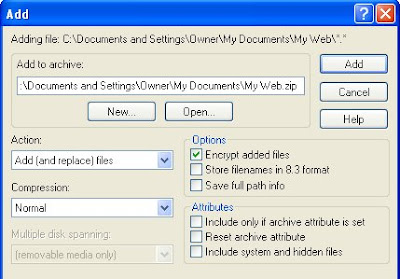
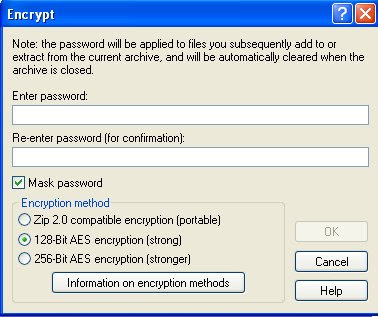
Because I have checked the Encrypt option the following windows appears after I click the Add button whereupon I input the password and check 128 bit before clicking the ok button.
Win Zip then goes about zipping up the file and creating the zip file itself.
When it's done I close Win Zip. And that is about it.
I then proceed to Media Fire and upload it. To date I have had no transfer problems or errors and have tested each zip file directly by downloading them from the blog itself, just like all visitors do. I have a specific folder for all my downloads so I do not get things confused.
Unzipping the file is just a matter of clicking on the file, right clicking, selecting Extract to C etc which is it's own folder located in the folder from which I am presently unzipping it from. A window pops up asking me for the password and I type it in (or you can swipe it and paste it in). If the password is correct is will unzip as I have requested it to do. And that is about it.
Issues which may prevent unzipping may be 1. an system that is not up to date 2. a system that does not have an up to date unzipping program 3. a system where one does not have admin rights to do any unzipping 4. an error in the downloading of the zip file. 5. an error in how one goes about unzipping the file itself. 6. a system that runs on 64 bits instead of 32 bits in which one may have to switch over to the 32 bits, thou the chance for this are slim.
7. the language in which one types in the password may cause an issue but I am not sure of this so don't quote me on it :)
I can think of no other issues at this time. Anyone got any ideas I have missed? Please post them so we can help Anne. I hope I have given you something that will work in all that babble, Anne, so you can unzip your files.
That's it from me for now. I have 1 more box to go through and then I will be done with that.
I will check in after Tyler goes to bed.
Until then...
Enjoy your day.
Huggins
Pat
I wish this posting window was bigger. I will have to go check into that a bit later but for now...
I received another message from Anne this morning in re to still having issues with the download. So I went about finding a solution but could find little if nothing at all. In light of this I thought it best to explain a few things which may help, I hope so :)
I am still running Windows XP SP3 and my system is fully up to date. I use a licensed version of Win Zip 9 which I purchased years ago. I also have the newest version of 7 Zip which I use for unzipping rar files. Both will work with any of my zip files.
After I have created the files I will add to the zip file, I create a new folder, name it, and move the files into it. I then right click that folder and from the menu select 'Add to Zip file' Win Zip then opens and the Add window appears. I then go about inputting the settings you see below.

Because I have checked the Encrypt option the following windows appears after I click the Add button whereupon I input the password and check 128 bit before clicking the ok button.

Win Zip then goes about zipping up the file and creating the zip file itself.
When it's done I close Win Zip. And that is about it.
I then proceed to Media Fire and upload it. To date I have had no transfer problems or errors and have tested each zip file directly by downloading them from the blog itself, just like all visitors do. I have a specific folder for all my downloads so I do not get things confused.
Unzipping the file is just a matter of clicking on the file, right clicking, selecting Extract to C etc which is it's own folder located in the folder from which I am presently unzipping it from. A window pops up asking me for the password and I type it in (or you can swipe it and paste it in). If the password is correct is will unzip as I have requested it to do. And that is about it.
Issues which may prevent unzipping may be 1. an system that is not up to date 2. a system that does not have an up to date unzipping program 3. a system where one does not have admin rights to do any unzipping 4. an error in the downloading of the zip file. 5. an error in how one goes about unzipping the file itself. 6. a system that runs on 64 bits instead of 32 bits in which one may have to switch over to the 32 bits, thou the chance for this are slim.
7. the language in which one types in the password may cause an issue but I am not sure of this so don't quote me on it :)
I can think of no other issues at this time. Anyone got any ideas I have missed? Please post them so we can help Anne. I hope I have given you something that will work in all that babble, Anne, so you can unzip your files.
That's it from me for now. I have 1 more box to go through and then I will be done with that.
I will check in after Tyler goes to bed.
Until then...
Enjoy your day.
Huggins
Pat
Subscribe to:
Posts (Atom)