


I received 8 messages in regards to both freebies downloads having errors.
I re-zipped both the files and have re-uploaded them. I had no issues with the file myself.
Please try not to download the file more the twice if you encounter issues.
Please let me know, asap, if these new files work.
I leave at 1 am. I tried the new zips and they work for me. I sure hope they work for you. Let me know, k.
Both previews in the posts below have been updated with links to the new zip files.
I will be back late tonight with another freebie for you.
It's so beautiful out so I am going back outside. We are going to start packing and repacking the truck at 8 pm. Fun, fun, fun, I tell you. It's always comical watching us do that LOL.
Enjoy your day.
Huggins
Pat
New Links to freebies without scrolling down.....
http://www.mediafire.com/file/3iem3jgmwy1/btmo_3_Fabric_Deco_Flowers.zip
http://www.mediafire.com/file/dwnmoyiaoma/btmo_13overlays.zip
:)
Showing posts with label zipfile. Show all posts
Showing posts with label zipfile. Show all posts
Friday, June 26, 2009

Wednesday, May 13, 2009
Suzi & Anon
Just popping in for a spell to address a couple of issues.
1. Anonymous the passwords for any zip file offered here is always in red. If you are coloured blind this may be a problem. The password for CeeCee is party.
I thought about the blindness issues the other day and decided that all future passwords would be in bold letters. (never two words and never in capitals)
2. Suzi I got your email. Check yours in the am tomorrow. I'll send them out later tonight after I put Tyler to bed.
Download issues can happen to any one, including myself.
Recently my gf sent me to a file to download which I did and the file showed it was 48+mb. I scanned it with my virus protection software and then proceeded to unzip it and poof win zip claimed it was a bad file. I told my gf and she resent it and viola it unzipped.
Just this morning I also got another file and the download was intermittent (having breaks in the download). Thou the end file was good it left me wondering what was going on. I noticed a great fluctuation in download speeds too. Once I changed browsers I had no issues. I usually use Firefox but IE was my hero this morning LOL.
I also had problems with Blogger this morning. The site was suppose to go down at 2am and it usually lasts for about an hour thou they claim 10 minutes. This morning I went to publish the comments and it claimed the site was down. I checked with Marie at DigiFree and she too was having issues, with Google.
The outage is now posted for tonight at 2 am. I'll be in dreamland by then LOL
Firefox and Google. Perhaps the two are just too tightly fitted together. LOL
I am off to be with my men for a while.
Thanks for reading this post I hope it helped.
Enjoy your day.
Huggins
Pat
1. Anonymous the passwords for any zip file offered here is always in red. If you are coloured blind this may be a problem. The password for CeeCee is party.
I thought about the blindness issues the other day and decided that all future passwords would be in bold letters. (never two words and never in capitals)
2. Suzi I got your email. Check yours in the am tomorrow. I'll send them out later tonight after I put Tyler to bed.
Download issues can happen to any one, including myself.
Recently my gf sent me to a file to download which I did and the file showed it was 48+mb. I scanned it with my virus protection software and then proceeded to unzip it and poof win zip claimed it was a bad file. I told my gf and she resent it and viola it unzipped.
Just this morning I also got another file and the download was intermittent (having breaks in the download). Thou the end file was good it left me wondering what was going on. I noticed a great fluctuation in download speeds too. Once I changed browsers I had no issues. I usually use Firefox but IE was my hero this morning LOL.
I also had problems with Blogger this morning. The site was suppose to go down at 2am and it usually lasts for about an hour thou they claim 10 minutes. This morning I went to publish the comments and it claimed the site was down. I checked with Marie at DigiFree and she too was having issues, with Google.
The outage is now posted for tonight at 2 am. I'll be in dreamland by then LOL
Firefox and Google. Perhaps the two are just too tightly fitted together. LOL
I am off to be with my men for a while.
Thanks for reading this post I hope it helped.
Enjoy your day.
Huggins
Pat
Thursday, April 09, 2009
Unzipping Issues
Blogger is strange LOL. I attempted to explain about Win Zip this morning when the entire post got all messed up. How did I know inserting images was such a difficult task LOL Thank goodness I learn from mistakes. :)
I wish this posting window was bigger. I will have to go check into that a bit later but for now...
I received another message from Anne this morning in re to still having issues with the download. So I went about finding a solution but could find little if nothing at all. In light of this I thought it best to explain a few things which may help, I hope so :)
I am still running Windows XP SP3 and my system is fully up to date. I use a licensed version of Win Zip 9 which I purchased years ago. I also have the newest version of 7 Zip which I use for unzipping rar files. Both will work with any of my zip files.
After I have created the files I will add to the zip file, I create a new folder, name it, and move the files into it. I then right click that folder and from the menu select 'Add to Zip file' Win Zip then opens and the Add window appears. I then go about inputting the settings you see below.
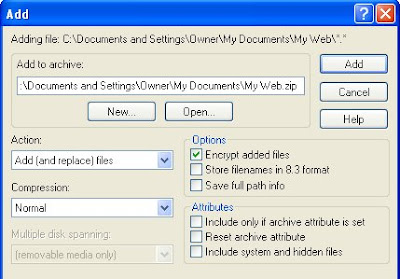
Because I have checked the Encrypt option the following windows appears after I click the Add button whereupon I input the password and check 128 bit before clicking the ok button.
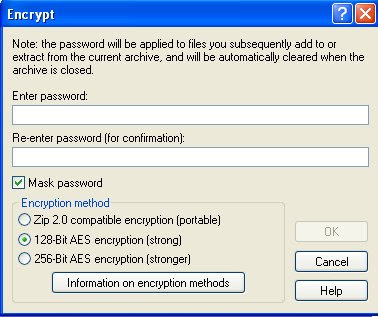
Win Zip then goes about zipping up the file and creating the zip file itself.
When it's done I close Win Zip. And that is about it.
I then proceed to Media Fire and upload it. To date I have had no transfer problems or errors and have tested each zip file directly by downloading them from the blog itself, just like all visitors do. I have a specific folder for all my downloads so I do not get things confused.
Unzipping the file is just a matter of clicking on the file, right clicking, selecting Extract to C etc which is it's own folder located in the folder from which I am presently unzipping it from. A window pops up asking me for the password and I type it in (or you can swipe it and paste it in). If the password is correct is will unzip as I have requested it to do. And that is about it.
Issues which may prevent unzipping may be 1. an system that is not up to date 2. a system that does not have an up to date unzipping program 3. a system where one does not have admin rights to do any unzipping 4. an error in the downloading of the zip file. 5. an error in how one goes about unzipping the file itself. 6. a system that runs on 64 bits instead of 32 bits in which one may have to switch over to the 32 bits, thou the chance for this are slim.
7. the language in which one types in the password may cause an issue but I am not sure of this so don't quote me on it :)
I can think of no other issues at this time. Anyone got any ideas I have missed? Please post them so we can help Anne. I hope I have given you something that will work in all that babble, Anne, so you can unzip your files.
That's it from me for now. I have 1 more box to go through and then I will be done with that.
I will check in after Tyler goes to bed.
Until then...
Enjoy your day.
Huggins
Pat
I wish this posting window was bigger. I will have to go check into that a bit later but for now...
I received another message from Anne this morning in re to still having issues with the download. So I went about finding a solution but could find little if nothing at all. In light of this I thought it best to explain a few things which may help, I hope so :)
I am still running Windows XP SP3 and my system is fully up to date. I use a licensed version of Win Zip 9 which I purchased years ago. I also have the newest version of 7 Zip which I use for unzipping rar files. Both will work with any of my zip files.
After I have created the files I will add to the zip file, I create a new folder, name it, and move the files into it. I then right click that folder and from the menu select 'Add to Zip file' Win Zip then opens and the Add window appears. I then go about inputting the settings you see below.

Because I have checked the Encrypt option the following windows appears after I click the Add button whereupon I input the password and check 128 bit before clicking the ok button.

Win Zip then goes about zipping up the file and creating the zip file itself.
When it's done I close Win Zip. And that is about it.
I then proceed to Media Fire and upload it. To date I have had no transfer problems or errors and have tested each zip file directly by downloading them from the blog itself, just like all visitors do. I have a specific folder for all my downloads so I do not get things confused.
Unzipping the file is just a matter of clicking on the file, right clicking, selecting Extract to C etc which is it's own folder located in the folder from which I am presently unzipping it from. A window pops up asking me for the password and I type it in (or you can swipe it and paste it in). If the password is correct is will unzip as I have requested it to do. And that is about it.
Issues which may prevent unzipping may be 1. an system that is not up to date 2. a system that does not have an up to date unzipping program 3. a system where one does not have admin rights to do any unzipping 4. an error in the downloading of the zip file. 5. an error in how one goes about unzipping the file itself. 6. a system that runs on 64 bits instead of 32 bits in which one may have to switch over to the 32 bits, thou the chance for this are slim.
7. the language in which one types in the password may cause an issue but I am not sure of this so don't quote me on it :)
I can think of no other issues at this time. Anyone got any ideas I have missed? Please post them so we can help Anne. I hope I have given you something that will work in all that babble, Anne, so you can unzip your files.
That's it from me for now. I have 1 more box to go through and then I will be done with that.
I will check in after Tyler goes to bed.
Until then...
Enjoy your day.
Huggins
Pat
Subscribe to:
Posts (Atom)